New Relic
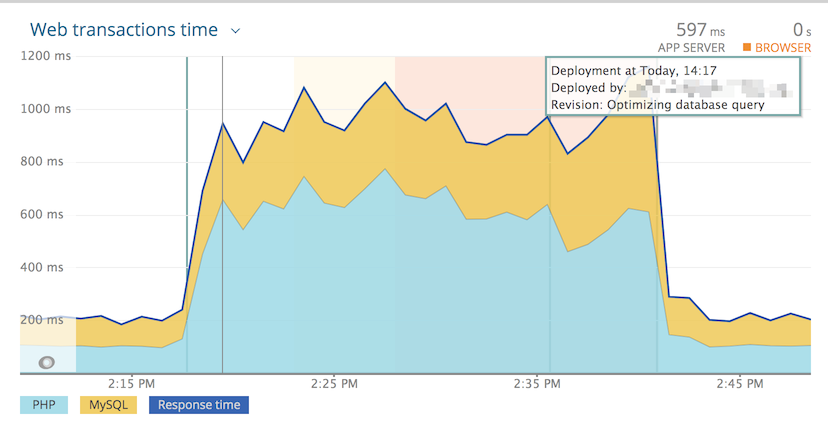
Create deployment markers in New Relic APM to track code changes alongside performance data.
Setup
- Create a New Relic User API Key
(format:
NRAK-XXXXXXXXXXXXXXXXXXXXXX). - Add
NEWRELIC_ENABLED(orVORTEX_NOTIFY_NEWRELIC_ENABLED) to hosting environment variables for environments where New Relic is configured. - Add
VORTEX_NOTIFY_NEWRELIC_USER_KEYto your hosting provider's environment variables.
Enable only where needed
Set NEWRELIC_ENABLED=true only in environments where New Relic APM is configured
(typically production and staging). This avoids API calls and potential errors
in development or feature branch environments.
Environment variables
| Variable | Required | Default | Location | Description |
|---|---|---|---|---|
VORTEX_NOTIFY_NEWRELIC_ENABLED | Yes | NEWRELIC_ENABLED | Hosting | Enable New Relic notifications |
VORTEX_NOTIFY_NEWRELIC_USER_KEY | Yes | Hosting | New Relic User API Key | |
VORTEX_NOTIFY_NEWRELIC_PROJECT | No | VORTEX_NOTIFY_PROJECT | .env | Project name |
VORTEX_NOTIFY_NEWRELIC_APP_NAME | No | Auto-generated | .env | Application name |
VORTEX_NOTIFY_NEWRELIC_DESCRIPTION | No | Default template | .env | Deployment description |
VORTEX_NOTIFY_NEWRELIC_CHANGELOG | No | Description | .env | Deployment changelog |
VORTEX_NOTIFY_NEWRELIC_USER | No | Deployment robot | .env | User performing deployment |
VORTEX_NOTIFY_NEWRELIC_ENDPOINT | No | https://api.newrelic.com/v2 | .env | API endpoint |
VORTEX_NOTIFY_NEWRELIC_BRANCHES | No | main,master,develop | .env | Restrict to specific branches (comma-separated) |
Example